
All major user-facing changes will be logged here.
2026 August
2026-2027 season update
- Updated scoresheets and rubrics for the BIOGLOW season
Future edition
- Added support for BIOGLOW future edition events. Select the event type when registering or creating an event.
- Scoresheet
- Rubric
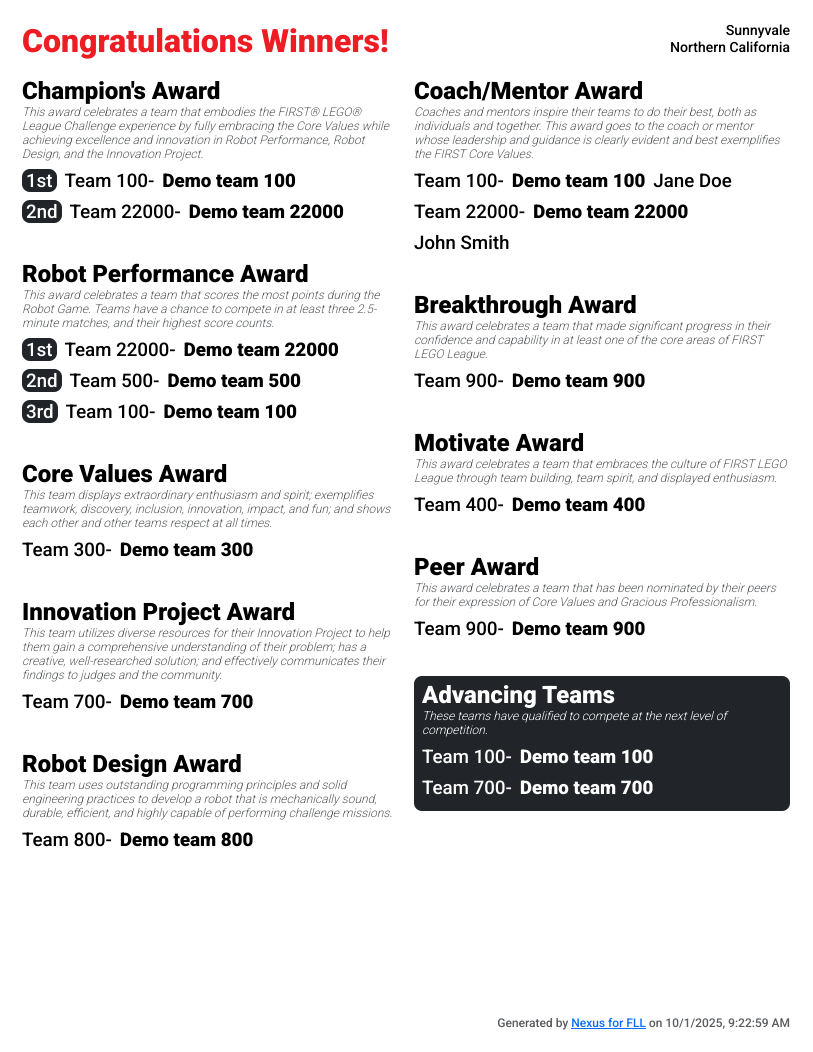
- Awards
- Leaderboard based on average score instead of best score
Self-serve event registration
- Event organizers can now register and pay for Nexus for FLL single event licenses directly on the website
- Region licenses and demos can still be acquired by contacting support
Judging rubrics
- Each judge account can now independently set rubric scores
- If multiple judge accounts set rubric scores, the independent scores for each rubric item are averaged together and rounded to the nearest whole score
- To keep legacy judging behavior, designate a single judge to enter scores into Nexus per team
- Feedback fields are still shared between all judges
- Judge advisors can choose to view entered scores from each judge account or as the average. By default, rubrics are read-only for judge advisors to prevent accidental edits
- The “Judge notes” field has been renamed to “Your notes” and is no longer shared between all judges. All notes are visible to judge advisors on the team rankings page
Awards management
- The awards list for each event can now be customized (remove default awards, change award details, and add new awards)
- Awards can be re-ordered to change the ordering on the awards PDF
- Added “Script” field to each award to optionally add additional event-specific text to the awards PDF
- Added option to display award winners as “finalist” instead of 2nd, 3rd etc
- Awards can be exported and imported as CSV to use the same configuration at different events
- Modification of awards config is limited once awards are assigned to teams- finalize configuration before starting assignment
Leaderboard
- When in fullscreen mode, the leaderboard will now automatically scroll if not all teams fit on the screen
Public scoresheets
- Added links to view submitted scoresheets (excluding Gracious Professionalism scores) from the leaderboard and team schedule page
Referee Gracious Professionalism notes
- Referees can now include notes that will be shared with judge advisors when rating a team as Developing or Exceeds or for all matches including practice
2026 May
Multi-day event support
For events that span multiple days, an end date can now be set in the create/edit event modal. When an end date is set, all time inputs will also require a date. When times are displayed, they will be displayed with a day indicator (e.g. “Sat” or “Sun”).
2025 December
Log in improvements
- “Device log in” is now supported allowing devices to request access without needing to log in to an email account
- A new “request access” flow allows users to directly request access to an event. Event administrators can review all pending access requests at the top of the event volunteers page.
- A QR code button is now available in the top right of the event volunteers page that will display a QR code that will direct any volunteers who scan it directly to the request access page
- When logging in with email, one time links will no longer be used up by certain email systems with security scanning
2025 November
Judging team rankings
- Teams that have been assigned a judged award will now also be indicated with an icon next to their team number
- When using the “manually assign area rankings” feature, Champion’s scores will now be computed for teams that do not have a rank in every category. Missing ranks will be calculated using a midpoint according to this formula:
((lowest rank + 1 + total teams) / 2). Champion’s ranks affected by this method are marked with asterisks.
Judging & game schedules
Schedules can now be exported from the edit page as a CSV file in the same format that is accepted as an upload.
Judging room & game table names
Judging rooms and game tables can now be individually named with event-specific labels (e.g. instead of Table 3 you can display Blue A). Update location names in the header row of the schedule editor.
2025 October
Rubrics
An optional feature that allows multiple judges to independently submit rubric scores for a single team that get averaged together is now available. Contact support@fll.nexus if you’d like to enable this feature at your event.
Robot game schedule configuration
Added “Max number of tables playing at once” option to robot game schedule configuration in order to alternate play on different sets of tables.
Login
Added “Sign in with Google” option in addition to “Sign in with email”.
Scoresheets
- Added optional “Referee name” field to each scoresheet.
- Added button to reset a scoresheet in case one was accidentally filled out
Advancement tracking
Judge Advisors can now select which teams will advance from the event on the team rankings page. The list of advancing teams will be included in the Awards PDF.
2025 September
Launch
Nexus for FLL is now available. Contact us for more information.